Looking for free payment tools to manage transactions in 2025? Here’s a quick overview of 10 options that can help small businesses save money while processing payments efficiently. These tools charge no setup or monthly fees and operate on a pay-as-you-go model, typically with transaction costs around 2.9% + $0.30 for online payments in the U.S.
Top Picks for Small Businesses:
- Square: Simple setup, no monthly fees, and versatile for retail and mobile businesses.
- PayPal: Popular for online invoicing and trusted by freelancers and occasional sellers.
- Stripe: Great for online businesses with customizable APIs and recurring billing.
- Helcim: Transparent pricing, ideal for businesses processing higher volumes.
- Payment Depot: Membership-based pricing with low per-transaction costs for steady sales.
- Dwolla: Focused on low-cost ACH transfers, perfect for B2B invoices.
- WePay: Embedded in software platforms for seamless payment integration.
- ecoPayz: A niche option for global e-commerce and digital services.
- Creditcall: Built for unattended payment systems like kiosks and parking meters.
- Charge.com: Flexible approval policies and low rates for multi-channel payments.
Key Considerations:
- Transaction Volume: If your monthly sales exceed $10,000, consider tools like Helcim or Payment Depot for lower rates.
- Business Type: Retailers may prefer Square, while online businesses might benefit from Stripe or PayPal.
- Payment Methods: ACH transfers with Dwolla can save costs on large invoices.
Quick Comparison
To find the best fit, evaluate your business needs, payment methods, and transaction volumes. Most of these tools allow you to start quickly, with no upfront costs, so you can test what works best for you.
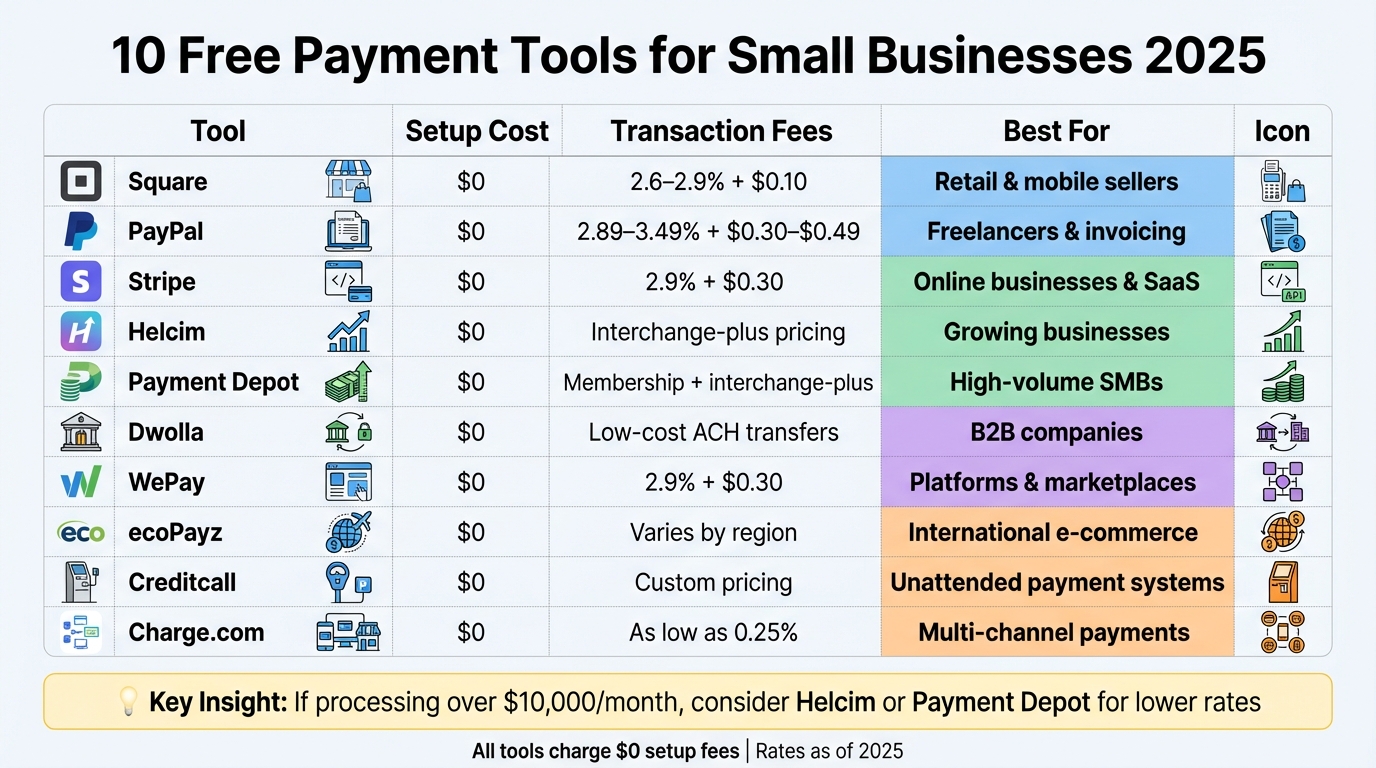
Free Payment Tools Comparison for Small Businesses 2025
1. Square
Square makes it easy for small businesses in the U.S. to accept card payments without worrying about upfront costs, monthly fees, or long-term commitments. It provides a free merchant account with no setup charges, making it an attractive option for entrepreneurs.
Setup Cost
Getting started with Square is completely free. You can sign up online in just a few minutes and receive a free magstripe card reader to use with your mobile device. If you need more advanced tools, like contactless/NFC readers or full POS terminals, those are available for purchase – but you don’t need them to start processing payments.
Transaction Fees
Square uses a straightforward fee structure:
- In-person transactions: 2.75%
- Online payments and invoices: 2.9% + $0.30 per transaction
- Keyed-in transactions: 3.5% + $0.15 per transaction
There are no hidden fees or minimum requirements to worry about.
Payment Types Supported
Square supports a wide variety of payment methods, including:
- Major credit and debit cards
- Contactless options like Apple Pay, Google Pay, and Samsung Pay
- Emailed invoices
- Payments through mobile apps
- Select ACH bank transfers
This flexibility makes Square a great fit for most small business needs.
Best Business Use Case
Square is ideal for businesses like retail shops, food trucks, cafes, salons, and pop-up vendors that need a simple way to accept in-person card payments. It’s also a great choice for freelancers and service providers who send invoices or accept online payments. For mobile or field service businesses, Square’s portability and ease of use are key advantages. Whether you’re running a storefront or working on the go, Square’s quick setup and versatile features make it a top choice for small businesses in 2025.
2. PayPal
PayPal is one of the most well-known online payment platforms, making it a go-to option for small businesses and freelancers across the United States. Its reputation for reliability and the ease of getting started make it especially attractive for entrepreneurs who want to begin accepting payments quickly. Here’s a closer look at why PayPal is a practical choice for U.S. small businesses.
Setup Cost
Getting started with PayPal Business is completely free. All you need to do is sign up online, link your U.S. bank account, and you’re ready to go – no setup fees, monthly charges, or long-term contracts required. Unlike traditional merchant accounts that often involve lengthy approval processes, PayPal activates instantly. This is a big win for freelancers and small business owners who need to hit the ground running.
Transaction Fees
PayPal uses a straightforward flat-rate pricing structure that depends on the type of transaction:
- Online payments: About 2.89% + $0.49 per transaction
- In-person payments (via PayPal Zettle or PayPal POS): Approximately 2.29% + $0.09 per transaction
Payment Types Supported
PayPal supports a wide variety of payment methods, including major credit and debit cards, PayPal balance, PayPal Credit, Venmo (for U.S. customers), and Pay Later options. It also offers tools like online checkout buttons, email invoices, QR codes, subscriptions, and in-person payment terminals – all accessible from a single dashboard. For businesses working with international clients, PayPal simplifies cross-border transactions by handling multiple currencies.
Best Business Use Case
PayPal is a great fit for freelancers, service providers, and occasional sellers who need a simple and efficient way to accept payments without dealing with complicated setups. Its invoicing tools are particularly helpful for businesses that bill clients regularly, while its support for subscriptions and international payments makes it versatile. Many e-commerce merchants in the U.S. also use PayPal as a secondary checkout option because its familiar logo can encourage customers to complete their purchases. With its strong brand recognition, built-in invoicing options, and secure payment processing, PayPal is an excellent starting point for consultants, digital product sellers, and micro-businesses looking to streamline their payment systems.
3. Stripe
Stripe stands out as a top payment processor for online businesses. Its developer-friendly tools and extensive payment options make it a popular choice for SaaS companies, e-commerce platforms, and other online-focused businesses across the United States.
Setup Cost
Stripe keeps things simple with no setup, monthly, or cancellation fees. There are also no long-term contracts to worry about. Signing up is quick and straightforward – just provide your basic business and banking details, and you’re ready to start accepting payments. Since there’s no traditional underwriting process, you can launch in minutes. The only costs you’ll encounter are transaction fees.
Transaction Fees
For U.S.-based businesses, Stripe charges 2.9% + $0.30 per successful online credit or debit card transaction. If you’re handling in-person payments through Stripe Terminal, you’ll benefit from lower rates. ACH bank transfers are another cost-effective option, especially for larger invoices or B2B transactions, as they come with lower fees and a capped maximum charge. For businesses selling internationally, keep in mind that payments involving international cards or currency conversions may include additional fees. These pricing structures, paired with Stripe’s wide range of payment options, make it a flexible solution for many businesses.
Payment Types Supported
Stripe supports a variety of payment methods, including major credit and debit cards like Visa, Mastercard, American Express, and Discover. It also handles ACH debits, ideal for subscriptions and B2B payments, and integrates with digital wallets such as Apple Pay and Google Pay. With the ability to process payments in over 100 currencies and automate recurring billing, Stripe is designed to accommodate businesses with global ambitions.
Best Business Use Case
Stripe is perfect for online-first businesses that prioritize customization and scalability. Its robust APIs allow for highly tailored checkout experiences, making it a great fit for companies that want full control over their branding and user experience. Whether you’re building a subscription-based SaaS platform or scaling an e-commerce store for international markets, Stripe offers the tools and flexibility to handle complex payment needs.
4. Helcim
Helcim takes a straightforward approach to payment processing with its transparent interchange-plus pricing model. This setup is particularly appealing to small businesses aiming to cut down on recurring fees while enjoying reduced per-transaction costs as their sales grow.
Setup Cost
Starting with Helcim is simple and budget-friendly. There are no setup fees, no application fees, and no long-term contracts to worry about. Plus, you won’t have to deal with PCI compliance fees, a common expense with many traditional payment processors. The only upfront investment involves purchasing hardware, such as card terminals, which Helcim offers at a one-time cost instead of a lease. This helps keep your initial expenses predictable and easy to manage.
Transaction Fees
Helcim’s interchange-plus pricing model adds a small markup to the card network’s interchange fees. For many small businesses in the U.S., this can lead to lower overall rates compared to the typical flat-rate model of 2.9% + $0.30, especially as monthly sales volume increases.
- In-person transactions usually have lower fees than online payments, with effective rates ranging from 2.3% to 2.6% for card-present sales.
- Online payments tend to fall between 2.6% and 2.9%, depending on factors like card type and transaction volume.
For example, a business processing $25,000 per month in-person could save about $100–$150 monthly – or over $1,200 annually – compared to flat-rate pricing. This clear and predictable fee structure works well alongside Helcim’s versatile payment options.
Payment Types Supported
Helcim supports a wide range of payment methods, including major credit and debit cards (Visa, Mastercard, American Express, Discover) for both in-person and online transactions. You can accept payments through chip, swipe, and contactless methods, as well as via hosted payment pages and virtual terminals. Additionally, Helcim offers invoicing, recurring billing, and ACH transfers for larger payments, which typically carry lower fees than card transactions.
Best Business Use Case
Thanks to its transparent pricing and flexible payment options, Helcim is a great fit for small businesses with steady monthly sales. It’s particularly beneficial for retail shops, cafés, or service providers processing several thousand dollars or more each month. If your business prioritizes reducing per-transaction costs over time and values clear, upfront pricing, Helcim’s interchange-plus model can lead to meaningful savings – especially for in-person sales.
5. Payment Depot
Payment Depot uses a membership-based pricing model that swaps traditional percentage markups for a flat monthly fee (ranging from $49 to $99) and a fixed per-transaction fee of about $0.10–$0.15.
Setup Cost
Starting with Payment Depot is free if you already own compatible payment terminals. For businesses with the necessary hardware, there are no application or setup fees. If you need new equipment, you’ll have to purchase it separately, but the lack of upfront charges makes it an appealing option. The straightforward pricing structure sets Payment Depot apart from standard flat-rate models.
Transaction Fees
Payment Depot’s pricing becomes more favorable as your transaction volume increases. The fees include only the actual interchange rate plus $0.10 to $0.15 per transaction. This structure keeps costs low and works well for businesses with steady or growing transaction volumes.
Payment Types Supported
Payment Depot supports all major credit and debit cards, including Visa, Mastercard, American Express, and Discover, for both in-person and online transactions. ACH bank transfers are also an option. The platform integrates seamlessly with a variety of third-party payment terminals and POS systems, letting you choose the hardware that best suits your business. For online sales, Payment Depot works with multiple e-commerce platforms and payment gateways, offering plenty of flexibility.
Best Business Use Case
Payment Depot is an excellent fit for small to medium-sized businesses processing $5,000 or more per month and looking for transparent pricing. It’s especially useful for retail stores, restaurants, and B2B service providers with consistent transaction volumes. If you already have payment equipment or prefer the flexibility to choose your hardware instead of being tied to a specific provider, Payment Depot offers a cost-effective and adaptable solution.
6. Dwolla
Dwolla takes a different approach compared to platforms focused on card payments – it’s all about ACH transfers. This makes it a great option for businesses that need direct bank-to-bank transactions. Whether you’re running a subscription service, a marketplace, or a SaaS platform, Dwolla is designed to handle recurring payments and payouts to contractors or vendors.
Setup Cost
Dwolla offers a free account with no upfront fees. You can explore its features using a sandbox environment at no cost, and small businesses with low transaction volumes can stick to the free tier as long as they need. However, Dwolla is strictly for U.S. bank accounts and credit unions, so it’s not an option for international payments.
Transaction Fees
The free plan comes with no transaction fees, which is a big plus for businesses handling smaller ACH transfers. If you move to a paid plan, Dwolla charges between $0.25 and $0.50 per ACH transaction – a fraction of what credit card processing typically costs. For businesses with higher transaction volumes, the flat fees become even more appealing thanks to volume discounts.
Payment Types Supported
Dwolla is laser-focused on ACH payments – it doesn’t handle credit cards, debit cards, or mobile wallets. Its features include single payments, recurring payments, and bulk transfers, all processed directly between bank accounts. With an API that enables custom workflows, it’s a flexible tool for businesses with specific payment needs. Just keep in mind, ACH transfers usually take 1-3 business days, which is slower but much cheaper than card payments.
Best Business Use Case
Dwolla is ideal for tech-savvy small businesses that need affordable ACH payments and have the resources to integrate its API. It’s a great fit for subscription-based companies, online marketplaces paying out sellers, B2B companies managing large invoices, and platforms that require payments between multiple parties. However, if your business relies on consumer payments at checkout or needs instant payment confirmations, Dwolla’s ACH-only model might not be the best fit. For businesses focused on cost efficiency and customizable payment solutions, Dwolla is a strong contender.
sbb-itb-8c45743
7. WePay
WePay is a payment solution that integrates directly with partner software, making payment acceptance a seamless part of the user experience. Instead of signing up for WePay as a standalone service, you’ll find it embedded within the software you already use – like invoicing tools, practice management systems, or membership platforms. Owned by JPMorgan Chase, WePay enables platforms and marketplaces to offer white-label payment solutions, so businesses can handle transactions without ever leaving their primary software environment. With its simple fee structure and easy integration, WePay is a practical choice for businesses that rely on software-based platforms.
Setup Cost
Unlike standalone merchant accounts, WePay is accessed through partner platforms. There are no setup fees or monthly charges for small businesses using WePay this way. You won’t need to apply for a separate merchant account or interact with WePay directly – your software platform manages the onboarding process, which typically takes just a few minutes.
Transaction Fees
WePay charges approximately 2.9% + $0.30 for online card transactions and around 1.0% + $0.30 for ACH transfers. Keep in mind, these rates may vary depending on the partner platform you’re using. For businesses processing less than $10,000 to $15,000 per month, the convenience of an integrated payment system can often outweigh any potential cost savings from alternative providers.
Payment Types Supported
WePay supports online card payments, including Visa, Mastercard, American Express, and Discover, as well as ACH bank transfers within the U.S. Depending on the partner platform, additional payment options like Apple Pay or Google Pay may also be available, further enhancing the user experience.
Best Business Use Case
WePay is ideal for small businesses that operate within a software platform. For example, nonprofits using fundraising software, therapists scheduling appointments through practice management tools, or associations collecting membership dues can all benefit from WePay’s embedded payment model. It eliminates the hassle of managing a separate merchant account, making it a convenient and efficient option.
8. ecoPayz
ecoPayz functions as a digital wallet rather than a traditional U.S. payment processor. It’s primarily popular in international markets and specific industries like gaming, digital services, and content platforms. For most U.S. small businesses in 2025, ecoPayz doesn’t serve as a practical primary payment solution. It lacks essential tools like in-person POS hardware, tap-to-pay apps, and straightforward card processing – features that local retailers and service providers rely on daily. This positions ecoPayz as a niche option rather than a go-to for everyday retail needs.
Setup Cost
ecoPayz doesn’t charge any setup or monthly fees, operating as a free e-wallet. However, costs arise from specific activities like transferring funds, withdrawing to bank accounts, or converting currencies. These fees are tied to specific actions rather than the flat per-transaction rates seen with other processors.
Transaction Fees
ecoPayz users encounter fees such as:
- Deposit fees: 1–3%
- Withdrawal fees: $1 to $5
- Currency conversion fees: around 2–3%.
Payment Types Supported
ecoPayz is designed for wallet-to-wallet transfers and maintaining online balances. Businesses can accept ecoPayz by adding it as an alternative checkout option on their e-commerce site or through a platform that integrates the service. Customers with ecoPayz accounts can pay using their wallet balance or linked payment methods. However, this setup only makes sense if a significant portion of the customer base already uses ecoPayz – something uncommon among U.S. consumers.
Best Business Use Case
ecoPayz works best for online-only businesses targeting international customers who already use ecoPayz wallets. This includes digital service providers, gaming platforms, or content creators who benefit from offering a global wallet option to improve conversions. For U.S. brick-and-mortar businesses like retail stores, restaurants, or local service providers, mainstream payment solutions with POS hardware, EMV chip readers, and mobile wallet support remain far more practical.
9. Creditcall
Creditcall is a payment gateway and processing platform designed to handle EMV chip cards, contactless payments, and unattended payment systems. Its technology integrates seamlessly with third-party systems like point-of-sale (POS) devices, kiosks, parking solutions, and e-commerce platforms. Most small businesses access Creditcall indirectly through their software or hardware providers rather than setting up individual accounts. This behind-the-scenes functionality makes it an essential tool for specialized retail and service environments, adding another layer to the free payment solutions available to small businesses in 2025.
Setup Cost
Many merchant service providers offer Creditcall-based accounts with $0 gateway setup fees and no monthly gateway charges when bundled into merchant account packages. While the platform itself might not require upfront costs, businesses may still need to invest in or lease EMV terminals, unattended kiosks, or POS hardware. In some cases, providers offer free terminal placement or subsidies for merchants processing significant monthly volumes, effectively reducing setup costs to zero for eligible small businesses.
Transaction Fees
Transaction fees for Creditcall vary based on the merchant account provider. Typically, small businesses encounter one of two pricing models:
- Flat-rate pricing: Around 2.6%–2.9% + $0.10–$0.30 per transaction.
- Interchange-plus pricing: Starts at interchange + 0.15%–0.35% with a small per-transaction fee, often better for businesses with higher transaction volumes.
Merchants should verify that there are no hidden monthly fees and request written documentation of interchange-plus markups to avoid unexpected costs.
Payment Types Supported
Creditcall supports all major card brands, including Visa, Mastercard, American Express, and Discover. It works with EMV chip, magnetic stripe, and NFC payments on compatible terminals, enabling Apple Pay, Google Pay, and other mobile wallets – a critical feature for modern in-person transactions in the U.S. The platform also supports e-commerce, in-app payments, and recurring billing, making it a solid option for subscription-based and invoice-driven businesses. While ACH or bank transfer capabilities may be available through partner add-ons, its primary strengths lie in card and digital wallet payments.
Best Business Use Case
Creditcall thrives in unattended or semi-attended settings like parking garages, vending machines, self-service kiosks, and ticketing systems where reliable EMV certification and offline-capable terminals are essential. It’s also a great fit for retailers and hospitality businesses that rely on POS vendors already integrated with Creditcall for seamless card acceptance across channels. For instance, a parking garage processing $60,000 monthly could switch from flat-rate pricing to Creditcall’s interchange-plus model, potentially saving $300–$500 per month while benefiting from robust EMV and contactless support. If your hardware or POS vendor uses Creditcall, or if your business requires specialized unattended payment capabilities, it’s worth considering.
10. Charge.com
Charge.com has been a trusted name in payment processing for over 25 years, offering a simple and accessible way for small businesses to accept payments across various channels. Whether it’s online, in-person, over the phone, by mail, or even via fax, this platform has you covered. One of its standout features is its willingness to work with nearly any legal business, including those with less-than-perfect credit histories. This flexibility makes it a practical choice for many small businesses looking for a reliable payment solution.
Setup Cost
One of the biggest perks of Charge.com is its lack of upfront costs. There are no setup, application, or cancellation fees, and the platform provides free payment processing software and equipment like EMV terminals and credit card readers. Plus, with no long-term contracts, businesses can switch providers anytime without facing penalties.
Transaction Fees
Charge.com offers competitive transaction rates starting as low as 0.25%, backed by its "Low Cost Assurance" guarantee, which is valid through March 1, 2026. This guarantee ensures that all costs are covered, including processing, transaction, monthly, annual, and cancellation fees, as well as expenses for hardware, software, or gateways.
Payment Types Supported
The platform supports all major credit cards – Visa, Mastercard, American Express, and Discover – along with checks. Businesses can process payments through various channels, such as online virtual terminals, e-commerce shopping carts, and in-person terminals. Charge.com also includes tools for managing and reporting transactions online, making it easy to track and organize payments.
Best Business Use Case
Charge.com is a solid choice for e-commerce businesses, retail shops, and phone or mail order operations that need to process payments through multiple channels. Its no-cost setup and inclusive approval policy make it especially attractive to businesses that have struggled to get approved by other payment processors. With 24/7 toll-free phone support available every day of the year, help is always just a call away.
Side-by-Side Comparison
The table below outlines key features of 10 free payment tools designed for small businesses.
| Tool | Setup Cost | Transaction Fees | Payment Types Supported | Best Use Case |
|---|---|---|---|---|
| Square | $0 setup, $0 monthly | 2.6–2.9% + $0.10 per transaction | Cards (Visa, Mastercard, Amex, Discover), contactless, mobile POS, online checkout, invoices | Brick-and-mortar retail and mobile sellers needing free POS software |
| PayPal | $0 setup, $0 monthly | 2.89–3.49% + $0.30–$0.49 online; 2.29% + $0.09 in-person | Cards, PayPal balance, Venmo, digital wallets (Apple Pay, Google Pay), recurring billing | Freelancers and occasional sellers wanting instant customer trust |
| Stripe | $0 setup, $0 monthly | 2.9% + $0.30 per online transaction | Cards, ACH, Apple Pay, Google Pay, 135+ currencies, subscriptions, APIs | Online-first businesses, SaaS platforms, and developers needing custom integrations |
| Helcim | $0 setup, $0 monthly | Interchange-plus pricing (lower effective rates for volume) | Cards, ACH, contactless, e-commerce, invoicing, recurring billing | Growing businesses processing higher volumes seeking cost savings |
| Payment Depot | $0 upfront (if reusing terminals) | Membership-style with interchange-plus rates | Cards, POS terminals, online gateways, invoicing | High-volume SMBs wanting lower per-transaction costs |
| Dwolla | $0 setup, $0 monthly | Low-cost ACH/bank transfers (often under 1%) | ACH/bank transfers, API integrations | B2B companies and platforms moving large invoice payments via bank transfer |
| WePay | $0 setup, $0 monthly | Around 2.9% + $0.30 per transaction | Cards, digital wallets, platform/marketplace payments | Platforms and marketplaces embedding payments for users |
| ecoPayz | $0 setup, $0 monthly | Varies by region and payment method | Cards, e-wallets, international payments, multi-currency | International businesses and customers needing global payment options |
| Creditcall | $0 setup, $0 monthly | Custom pricing (contact for rates) | Cards, contactless, POS integrations, secure payment APIs | Businesses requiring PCI-compliant, secure payment infrastructure |
| Charge.com | $0 setup, $0 monthly, free equipment | As low as 0.25% (Low Cost Assurance through 03/01/2026) | Cards (Visa, Mastercard, Amex, Discover), checks, online, phone, mail, fax | E-commerce, retail, and mail/phone order businesses, including those with credit challenges |
Key Considerations
While these tools advertise no setup or monthly fees, transaction costs can add up. If your business processes over $10,000 monthly, models like Helcim and Payment Depot – which offer interchange-plus or membership pricing – can help cut costs. Watch out for additional fees like chargebacks, currency conversion markups, and surcharges for high-risk transactions, which aren’t always upfront in the pricing details.
Matching Tools to Your Needs
Your choice of payment tool should align with your business model, transaction volume, and preferred payment methods. For instance:
- Retail or coffee shop owners: If you primarily handle small card payments (e.g., $15 per transaction), tools like Square with free POS software and flat pricing are ideal.
- SaaS startups: For subscription billing (e.g., $29/month plans), platforms like Stripe with recurring billing APIs and multi-currency support are a great fit.
- B2B firms: Sending large invoices over $5,000? ACH payment solutions like Dwolla can save you significantly compared to card fees.
For businesses with unique needs, such as high-risk merchant accounts or specialized hardware, providers like Secured Payments offer custom solutions. While not free, they provide tailored services like credit card processing, e-commerce integrations, and consulting for U.S. businesses needing more robust infrastructure.
Conclusion
This guide has walked you through several free payment tools, helping you take the next steps in choosing the right one for your business.
In 2025, free payment tools are a game-changer for small U.S. businesses, allowing them to save money by avoiding setup fees and monthly charges. Instead of hefty upfront costs or binding contracts, you only pay when a transaction occurs – usually around 2.9% + $0.30 per card payment. This setup helps preserve your cash flow and enables businesses to start accepting payments within hours.
The right tool depends on your business model: Square is ideal for in-person sales, PayPal is great for online invoicing and building trust, Stripe works well for recurring SaaS billing, and Dwolla is perfect for handling large B2B invoices through ACH transfers.
If your monthly transaction volume exceeds $10,000, take a closer look at the effective rates of each provider. Analyze your recent transaction data, apply their fee structures, and compare the overall costs. Sometimes, a provider with a small monthly fee but lower per-transaction rates can save you hundreds of dollars over the year.
For businesses with more complex needs – whether you’re in a high-risk category or require custom integrations – providers like Secured Payments can offer tailored solutions. These options often combine competitive pricing with specialized hardware and risk management tools.
To make your decision, list your payment channels and monthly volume, then narrow it down to two or three tools from this guide. Test them out by evaluating their transaction speed, cost, and ease of use. Choose the one that aligns with your current needs, and revisit your choice as your business evolves.
FAQs
What should I look for when selecting a payment tool for my small business?
When picking a payment tool for your small business, it’s important to consider growth potential, security, and dependability. Look for a solution that can keep up as your business expands and manage higher transaction volumes without any hiccups. Ensuring secure payment processing is also crucial to safeguard customer data and comply with industry standards.
You’ll also want to think about how easily the tool integrates with your current systems, whether the pricing is clear and straightforward, and if reliable customer support is available when you need it. Choosing the right payment tool can make transactions smoother, build customer confidence, and set your business up for long-term success.
How do transaction fees affect my overall business expenses?
Transaction fees can pile up fast since they’re charged for every payment processed using a tool. These costs directly affect your profit margins and overall expenses. Opting for payment tools with lower or clearly outlined fees can make a big difference in managing costs and protecting your bottom line. Take the time to review the fee structure carefully to ensure it fits your business requirements.
What is the best payment tool for managing international transactions?
For managing international transactions, Secured Payments provides solutions that make global payment processing straightforward. Their integrated and e-commerce payment options are dependable and flexible, designed to suit the unique needs of businesses handling cross-border payments. These tools prioritize security and ease of use, enabling your business to operate across borders with peace of mind.